Download
Private AI for your Mac

Your own private AI, right on your Mac.

New to AI? Get your own personal AI that lives on your Mac, free, in a few minutes. Download itokens and open it: it looks at your Mac, asks what to call you, and sets everything up for you.

  1. 1
    Download and open itokens
  2. 2
    Tell it your name
  3. 3
    Chat privately, in minutes

macOS 14+ · M1 or newer · Signed and notarized

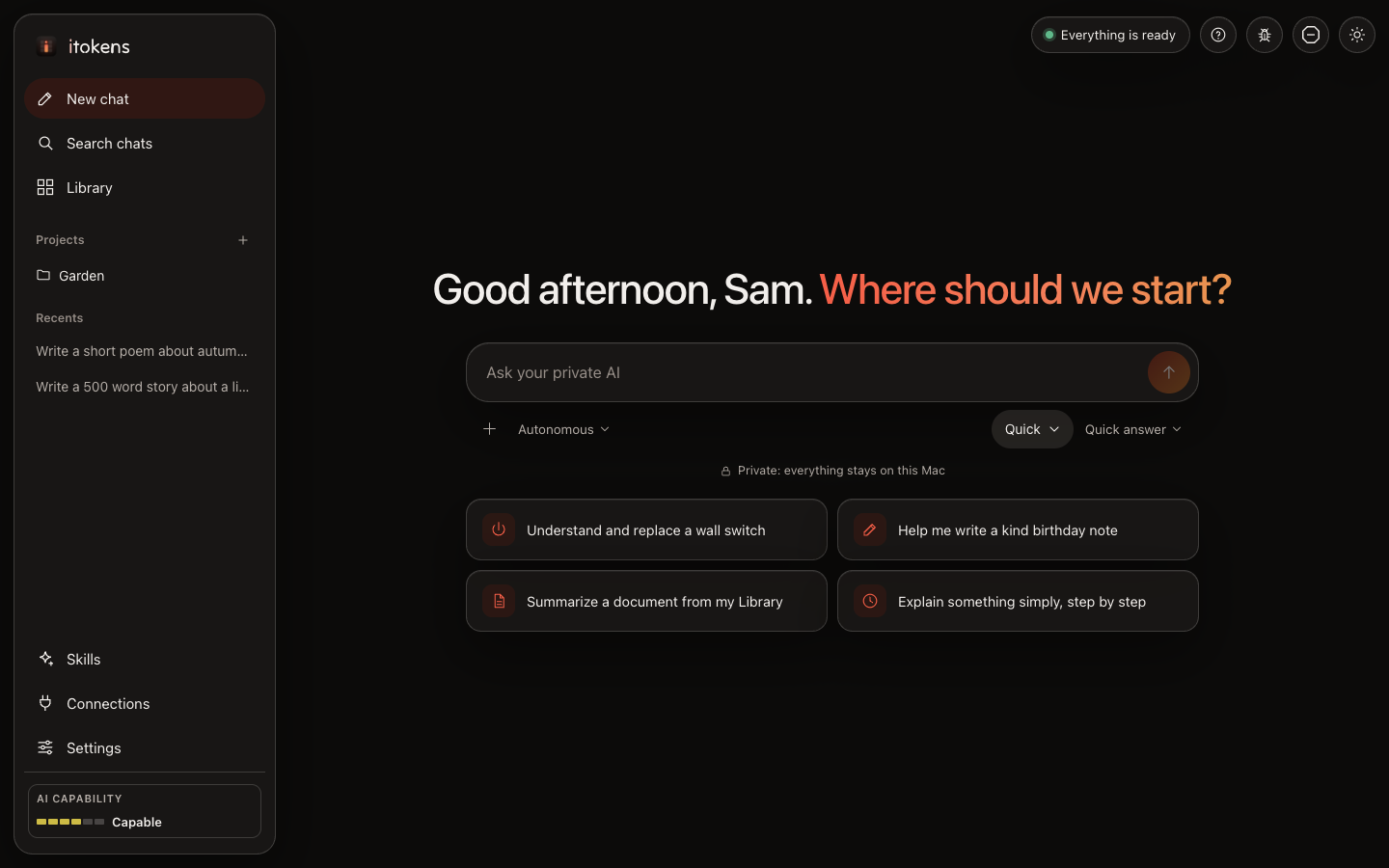
itokens: a private chat on your Mac, with suggestions to start from
See it work

All of it, right on your Mac.

Everything you see here runs on your own Mac: the AI, your chats, your files. Nothing is sent to a cloud. Pick a part to jump to it.

Everything runs on your Mac and nothing leaves it. itokens looks at your Mac, asks your name and sets everything up; you chat; in Plan mode it shows a plan to approve; it can save skills you ask for; with a connection it asks before using a tool; Settings shows your Mac, which models it may use, new models and backups.

Benefits

Your AI. Your Mac. Your business.

itokens runs AI on the Mac you already have. Our privacy policy

Private AI that never leaves home.

Your conversations and files stay on your Mac, right where they belong.

All the smarts, none of the cloud.

What you say to your AI stays between you and your Mac.

Ask anything. Share nothing.

Your chats and files never leave your Mac.

Made for everyday life

Ask, write, plan and understand. Privately.

No technical choices: itokens sets everything up for you and keeps it running.

Help with everyday things

Understand and replace a wall switch, write a kind birthday note, or have something explained simply. Answers appear as they are written.

  • Suggestions to start from, or just speak: the microphone types for you
  • Your chats, saved, searchable and grouped in projects
  • Add documents to your Library and ask about them
  • Skills you make by asking, and connections to your other apps
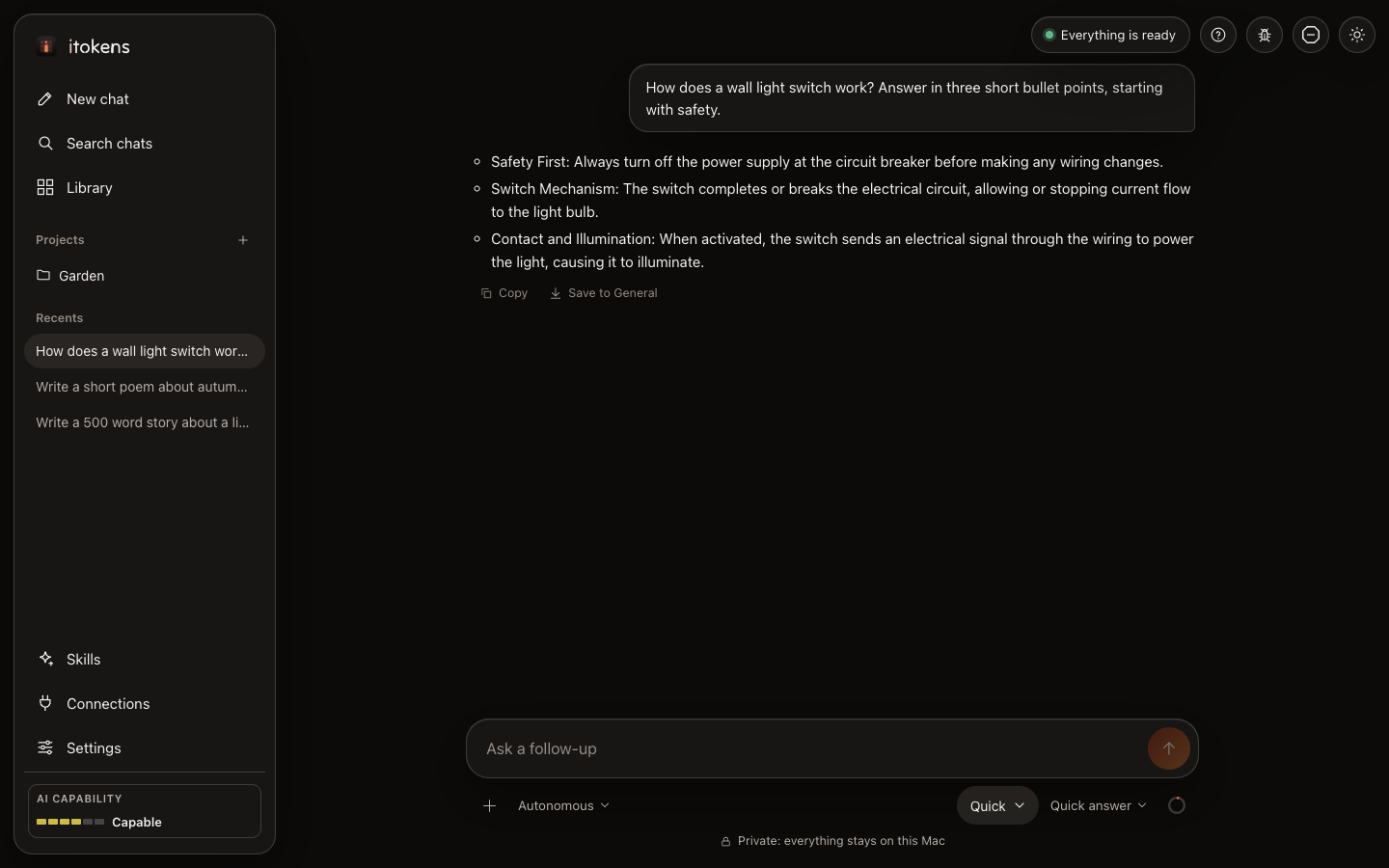
itokens: an everyday question and its answer

Set up by itself

itokens looks at your Mac, asks what to call you, then picks the right AI for your Mac and installs everything, with no password. It tells you what it is doing, and a chat opens when it is ready.

  • A model checked on a Mac, sized for yours
  • An honest rating of what your Mac can do
  • A fifth of your Mac's memory always left for your other apps

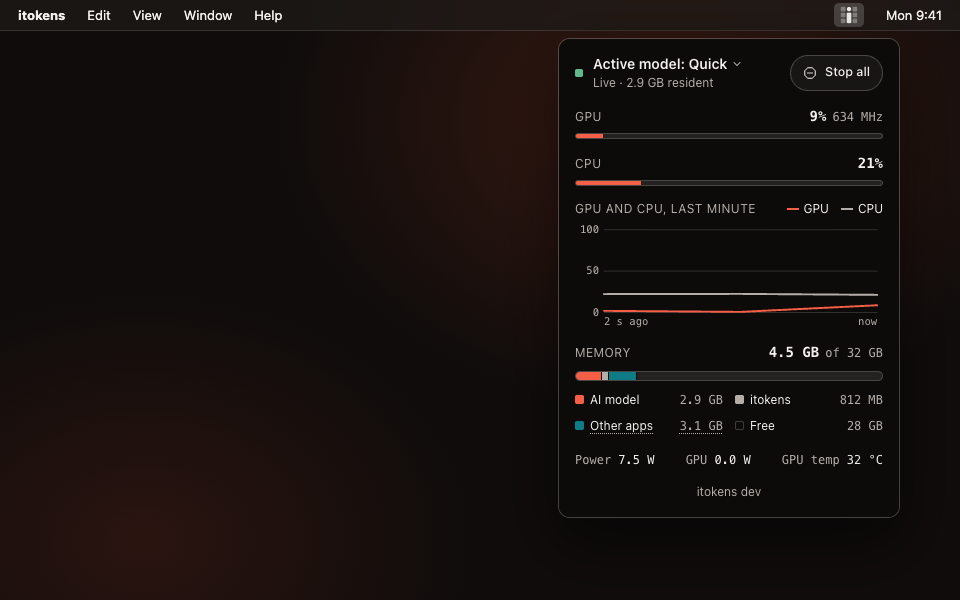
Right there in the menu bar

Click the orb in the menu bar to see your AI at work: the model, the GPU and CPU, memory and downloads. It tells you when an update is ready, and updates in one click.

itokens's panel dropping down from the orb icon in the menu bar
Privacy

Your Mac, your AI, your call.

Only the services it needsYour AI runs on your Mac. itokens downloads the model from Hugging Face and its tools from GitHub and the Python Package Index, and checks GitHub for updates. The full list.
Never what you writeA short daily check-in counts versions, Macs and which AI models are used. Deeper anonymous usage is shared only if you choose to. Your words, chats and files are never sent.
Locked down by defaultLocal only, a single-use launch link, a strict content policy, and downloads limited to model weights, never code.
FAQ

Questions

Is itokens free?

Yes. itokens is free to use.

Do I need to know anything about AI?

No. itokens asks one thing, what to call you, then picks the right AI for your Mac, installs it by itself and opens a chat.

Which Macs does itokens support?

Apple Silicon Macs (M1 and later) running macOS 14 or later. itokens runs AI on the Apple GPU, which Intel Macs do not have.

Does itokens send what I type anywhere?

No. Your AI runs on your Mac, and what you write, what it answers and your files stay there. The privacy policy lists the few services itokens contacts, such as Hugging Face for the model files and GitHub for updates.

Will it slow my Mac down?

itokens always leaves a fifth of your Mac's memory for macOS and your other apps, and tells you if memory gets nearly full so you can close apps you are not using.

Which AI models does itokens use?

By default, models made in the United States: Llama by Meta and Gemma by Google, checked on a Mac before being offered. You can allow models from other countries in Settings, and itokens moves to newer ones by itself once they pass a test on your Mac.

How is itokens updated?

itokens keeps itself up to date: it checks the download (Developer ID signature, Apple notarization, checksums), installs it and opens again. Homebrew installs update with brew. How updates work.

Download

Your own AI is one download away.

Free, for Apple Silicon Macs running macOS 14 or later.